Ask any high school teacher — detecting the use of AI is big business, and challenging. That essay on why zero didn’t appear in western mathematics until nearly the Renaissance was supposed to be written by your kid, not your kid’s computer…
Popular myth will tell you that the use of em-dashes in text is almost certainly an indicator of AI authorship, but that notion is precisely what I called it: a myth. Here’s why people believe it:
- Em-dashes tend to be used by professional writers more frequently than casual writers.
- AI systems are trained heavily on professional writing samples.
- Hence, AI tends to use em-dashes, and use them correctly.
I imagine I’m not the only writer who’s irked by the misconception. I was using em-dashes in novels, short stories, and emails long before kids were using Claude to cheat on their homework.
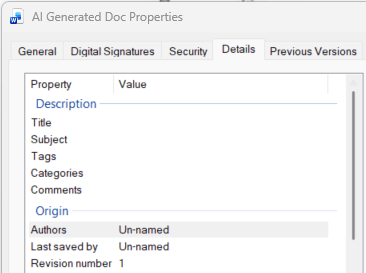
That said, there are some certainly some hints that AI was the author of a document. Here’s a pretty concrete one: open up the Properties for a document, and look at both the “Authors” and “Last saved by” values.
The property sheet here is for a Word doc I asked Claude to generate. The tool Claude used defaulted to “Un-named” for both properties. Other AI tools tend to populate these fields with “python,” as they use Python scripts to generate files.
Obviously, the presence of these values doesn’t definitively tell you that the document was created by AI, but it’s a pretty strong telltale.
More importantly, seeing a valid name isn’t a guarantee that the file was NOT created by AI. I can edit the “Authors” property manually, and as soon as I save the file the “Last saved by” will update to my user name or initials.
In fact, Claude lets me specify those property values before the file is created. If a user wants to obfuscate the AI origins of his/her content, changing this default is a pretty obvious action, so don’t count file properties as proof of provenance. Just know that this is something you can look at, and there’s a possibility it’ll be informative.
 Hit Me With Your Best Prompt
Leave a comment